

Blocking Jobs
Blocking jobs are jobs that will only execute if an additional unblock operation (or "approval") has explicitly been given.
Usually conditions meet most of your needs when writing jobs that do not need to be executed on every change. For instance, you'll only want to build a submodule if any code has changed in its source directory. But even then it may be necessary or desirable to wait for human approval before executing a certain job. Think of applying infrastructure changes (e.g. when using Terraform): you may want to review what will happen before the changes are actually applied, lest you accidentally erase your production database!
In MonkeyCI it's very easy to make a job blocking: just set the blocked property to true for that particular job. For example:
(ns build (:require [monkey.ci.api :as m])) (-> (m/container-job "terraform-apply") (m/image "docker.io/hashicorp/terraform:latest") (m/script ["terraform apply"] ;; Only execute after approval (m/blocked))
Or in yaml:
- id: terraform-apply type: container image: docker.io/hashicorp/terraform:latest script: - terraform apply # Only execute after approval blocked: true
This will result in a job that becomes blocked as soon as it is eligible for execution (i.e. when all dependencies have successfully completed). At this point, the script will block until either a user has allowed the job to continue, or an API request is received that unblocks the job.
In the user interface, it will look like this:
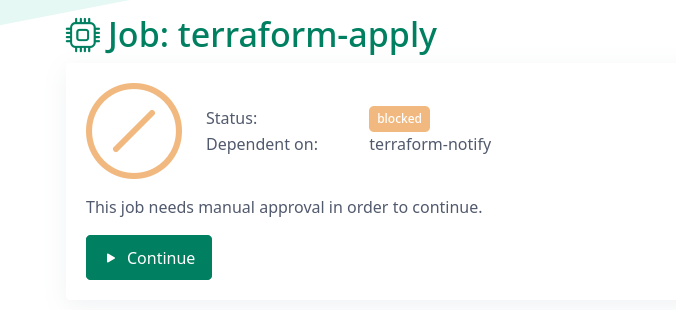
Clicking the "Continue" button will unblock the job, and it will be queued for execution.
Due to implementation details, the build is paused until approval is given. If this is not done before the build times out (after 1 hour), the build will fail. In the future, we will allow builds to suspend indefinitely, which will remove this limitation.